
Features
XLL+ is a toolkit to aid C/C++ programmers in the construction of Excel add-in libraries. Among its features:
- Creates complete Visual Studio projects, ready to compile and run.
- Function Wizard helps you write Excel add-in functions and generates most of the code for you.
- Powerful class library contains C++ classes which hide all the complexity of the Excel SDK, and make it very easy to write powerful, safe add-in functions, and to write them very fast.
- Extensive documentation, including reference guide, tutorial, walkthroughs and interactive help.
- Many complete sample projects, demonstrating XLL+ features.
- Supports all versions of Excel, including both 32-bit and 64-bit versions.
- Fully integrated with Microsoft Visual Studio 2022, 2019, 2017, 2015, 2013, 2012, 2010, 2008 and 2005.
- Generates an Excel help project from your source code and comments.
- No Visual Basic is required.
- No knowledge of the Excel SDK is required.
AppWizard
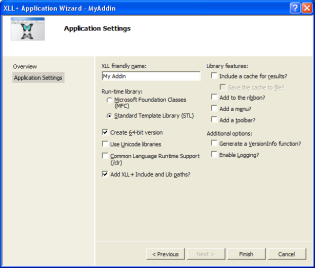
The AppWizard creates a complete project under Microsoft Developer Studio, ready to be built and debugged.
You can decide whether to include various optional features, such as MFC (Microsoft Foundation Classes) integration, Unicode character set, and version information.
Function Wizard
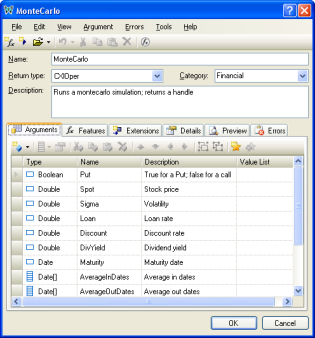
The Function Wizard is a Visual Studio add-in. It will write the skeletons of functions for you and make sure that they are properly registered and described to Excel. Later, if you add to or change the function's arguments, you can use the Function Wizard to keep the registration details in sync.
The Function Wizard also generates blocks of code that check all the function's inputs for consistency, and extract them into useful variables, such as STL collections.
XLL Add-ins Window
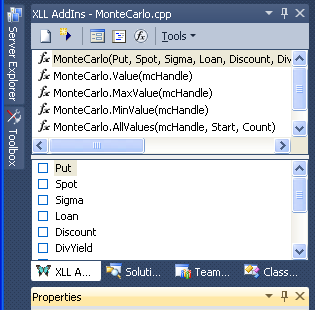
The XLL Add-ins window is a tool window within Visual Studio. It displays all the add-in functions in the current C++ source file. You can use it to edit your add-in functions directly, without a popup editor, and you can use it to edit multiple functions at the same time.
Any changes you make will immediately be reflected in your code.
All changes made via the XLL Add-ins window can be reversed using Undo, just as if you had made them with the editor.
Class Library
The class library contains a set of C++ objects which hide the complexity of Excel's data interface. In particular, the classes manage all memory issues. A set of virtual functions is provided so that the programmer can write event handlers for the opening, closing or registration of the add-in library.
See the Class Reference for more information
Help for your add-in functions
XLL+ automatically generates a complete CHM help file in Excel help format. This help will be available within Excel to users of your functions. You can add your own content to any function or argument, and you can add your own pages.
See the User Guide for more information
XLL+ Documentation
The XLL+ documentation is integrated into Visual Studio, and contains a huge fund of useful information.
- Fully integrated into Visual Studio 2022, 2019, 2017, 2015, 2013, 2012, 2010, 2008 and 2005.
- On-line reference to all classes and functions
- User guide
- Tutorials
- Walkthroughs for important features
- Example code for all methods
Sample Code
- Dozens of sample projects are provided to show you how to use all the features of Excel and XLL+
- Walkthroughs take you quickly through the standard features of Excel add-ins
- There are also smaller sample functions to illustrate all XLL+ methods and classes
Supports all versions of Excel
Binaries built with XLL+ run under all versions of Excel on the PC platform:
- Office 365 (64-bit and 32-bit)
- Excel 2021 (64-bit and 32-bit)
- Excel 2019 (64-bit and 32-bit)
- Excel 2016 (64-bit and 32-bit)
- Excel 2013 (64-bit and 32-bit)
- Excel 2010 (64-bit and 32-bit)
- Excel 2010 (32-bit)
- Excel 2007
- Excel 2003
- Excel 2002/XP
- Excel 2000
- Excel 97
- Excel 95
Supports Microsoft Visual Studio
Versions of XLL+ are available for the following versions of Visual Studio:
- Visual Studio 2022
- Visual Studio 2019
- Visual Studio 2017
- Visual Studio 2015
- Visual Studio 2013
- Visual Studio 2012
- Visual Studio 2010
- Visual Studio 2008
- Visual Studio 2005
- Visual Studio .NET 2003
- Visual Studio .NET (2002)
- Visual Studio 6
Asynchronous functions
Simply by checking a box in the Function Wizard, you can generate all the code to run an add-in function in a background thread.
Object handles
Using our object handle classes, you can use add-in functions to create objects in your code, and expose their properties and methods in Excel. Our simple handle mechanism ensures that the exposed properties are always up to date, and that changes to the objects are reflected in the spreadsheets.
Languages other than English
Our libraries make sure your code works properly in all language versions of Excel. Your XLL can easily be localized so that users see all argument names and help texts in their preferred language.
All the standard error messages returned by the framework can be displayed in the language of the user.
See the User Guide for details
.NET assemblies
XLL+ can import an entire .NET assembly, and automatically generate Excel add-in functions for any public methods or properties.
.NET and COM wrapper libraries
You can generate all the source code for a COM and .NET wrapper library, to expose your XLL add-in to any .NET or COM client language, including VB.NET, VBA, C# & F#. This will let programmers write stand-alone applications, independent of Excel, which can call your XLL add-in functions as normal .NET or COM methods.
See the XLL+ Reference for details
Event model
You can implement event handlers to trap most Excel application events, such as files opening and closing, user input, calculation etc. You don't need to write any COM code: the XLL framework handles all the work.
The framework uses a standard notification event model, and makes it extremely simple to add your own event handlers.
See the User Guide for more information
MFC Support
Libraries can be built using the MFC build, so that they will be fully integrated with the Microsoft Foundation Classes, which makes it easy to use MFC windows and other classes from within your add-in.
Unicode Support
Libraries can be built using the Unicode character set, so that if you use a language other than English, your code can handle text in the normal way.