
PRB: Functions with no arguments have no description in the Excel Formula Wizard
Reference: Q0002
Article last modified on 01-Jun-2002
The information in this article applies to:
- XLL+ for Visual Studio .NET - 3, 4.1, 4.2, 4.3.1
- XLL+ for Visual Studio 6 - 3, 4.1, 4.2, 4.3.1
- Excel - all versions
Functions with no arguments have no description in the Excel Formula Wizard
Symptoms
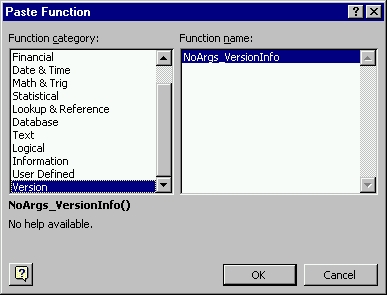
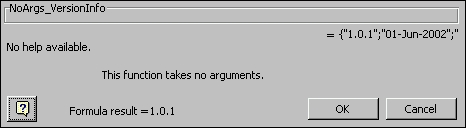
When an XLL+ function with no arguments is displayed in the Excel Formula Wizard, the following message is displayed.
This occurs even when a help string for the function has been defined using the XLL+ Function Wizard.No help available.
Summary
-
The Excel Formula Wizard offers two types of behaviour for XLL+ add-in
functions which have no arguments:
- Display the string "No help available." as discussed above.
-
Display an empty text box, prompting for a non-existent argument:
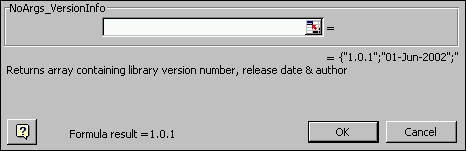
We consider the first behaviour - displaying no help - to be less bad than the second behaviour - displaying a misleading prompt.
- The XLL+ run-time library defaults to the first behaviour ("No help available.") You can use a work-around to force the second behaviour.
- We are working to find an optimum solution (i.e. displaying the correct help text, and not displaying the irrelevant and misleading edit box).
Procedure for applying the work-around
In the module's InitInstance() function, call something like the following:
FindFn("NoArgs_VersionInfo")->m_stArgNames = " ";
The trick here is to convince the XLL+ run-time that there are
some arguments to the function, thereby triggering the second class of
behaviour.
The argument to FindFn() should be the exported (Excel) function name. The string assigned, as the right-hand-side value, should be a single blank: " ".
It is essential that the work-around be called after the call to AddStaticFns(). For example:
BOOL CNoArgsApp::InitInstance()
{
    // Call the base class
    if ( !CXllApp::InitInstance() )
        return FALSE;

    // Set the name of the library to the default value
    m_stName = m_pszDefName;

    // Add the statically defined function specifications
    AddStaticFns();

    // TODO: Add your specialized code here
    FindFn("NoArgs_VersionInfo")->m_stArgNames = " ";

    return TRUE;
}